Ghost Kitchen Food Photography (2026): How to Look Like a Real Brand
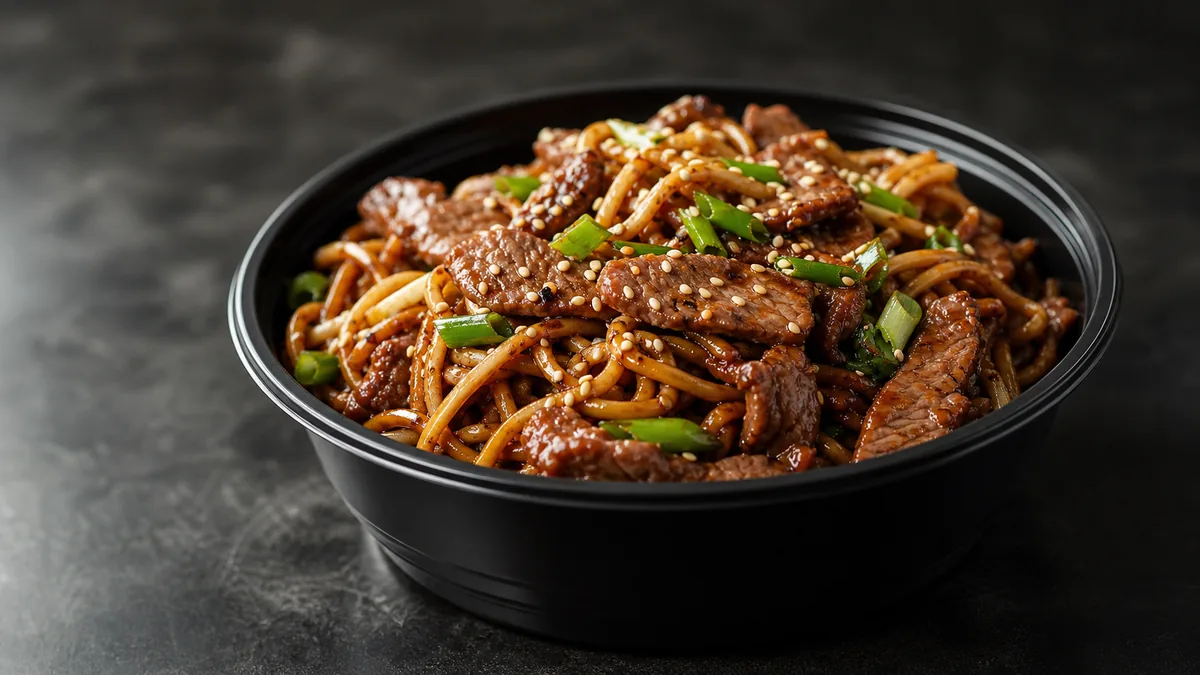
A ghost kitchen has no sign, no window, and no dining room. On a delivery app, your food photography is the entire storefront — it’s the only thing a customer sees before they decide whether your brand is real. That’s why generic, mismatched menu photos quietly kill virtual brands: a grid of inconsistent shots reads as "random menu," and random menus don’t get the order. This 2026 playbook shows how to build a repeatable photo style and ship clean, branded listing images fast.
The bar isn’t art-gallery photography. It’s consistency that makes a virtual brand look legitimate at a thumbnail glance.
Why ghost kitchens live or die on photos
A storefront restaurant has a dozen trust signals: the building, the smell, the staff, the room. A ghost kitchen has one — the listing. When every dish on that listing is lit differently, shot from a different angle, and sitting on a different background, the customer’s brain reads it as unprofessional even if the food is excellent. The fix is not better individual photos; it’s a consistent system applied to every photo.
Step 1: Define your brand’s photo style
Before you shoot anything, decide the look and write it down:
- Background: one surface for the whole brand (clean white for bright/modern, dark slate for premium, warm wood for comfort food).
- Angle: pick a default — usually 30-45° for plated and bowl dishes, overhead for flat builds.
- Lighting: soft and directional, same direction every time.
- Crop: thumbnail-first, near-square, food filling most of the frame.
- Color and gloss: natural, appetizing, consistent saturation.
This is your style sheet. Every dish gets the same treatment, so the menu reads as one brand. Our menu photo composition rules help you lock the framing decisions.
Step 2: Build a 10-minute capture station
You don’t need a studio:
- A clean table near a window with indirect light (or one daylight LED panel).
- Your chosen background surface.
- A white foam board opposite the light to fill shadows.
- A phone on a small tripod at your fixed angle.
Mark the phone and light positions so the setup is identical every session. The phone food photography guide covers the capture mechanics in detail.
Step 3: Shoot the menu in batches
- Group dishes by build so you can plate quickly in sequence.
- Garnish each dish last, right before the shot.
- Take 10-15 frames per dish; keep the angle and framing locked.
- Wipe the bowl or plate rim every time — delivery food is saucy and shows drips.
Batching is what makes this affordable in time. Knock out a whole virtual brand’s menu in one sitting.
Step 4: Enhance for a uniform finish
This is where consistency becomes effortless. Run every shot through FoodPhoto.ai with the same settings: it fixes lighting, cleans the background to your chosen surface, restores gloss, and crops to spec — without changing the food. Because it enhances the real photo of your real dish, the listing matches what arrives at the door. Apply the same enhancement to every dish and the grid snaps into a single brand look. Test it on one bowl in the Menu Test Pack first.
Step 5: Export and publish to spec
Each platform wants slightly different sizes. Shoot a touch loose and crop:
| Use | Crop |
|---|---|
| Delivery app item photo | Near-square, food centered, safe margins |
| Delivery app hero/banner | Wider, leave room for overlays the platform adds |
| Google Business Profile | Near-square, clean background |
| Social | Vertical for Stories/Reels, square for feed |
For platform-by-platform sizing and a no-rework export flow, see the cross-platform delivery photo checklist.
Step 6: Govern multiple virtual brands
Most ghost kitchens run more than one concept out of the same kitchen. Keep them distinct and consistent:
- One style sheet per brand — different backgrounds or color moods so the brands don’t blur together.
- Same capture station, different surface swapped in.
- Same enhancement discipline within each brand.
- A simple naming convention so files don’t get mixed between brands.
When a brand needs a refresh or a new item drops, you already have the recipe — no reshoot of the whole menu. For the ongoing rhythm, our ghost kitchen weekly system lays out the weekly loop that keeps everything current.
The ghost kitchen photo checklist
Before you publish a single item, run the listing through this gate. It is the difference between "real brand" and "random menu":
- Same background on every dish in the brand. One surface, no exceptions.
- Same angle logic. Bowls overhead or steep 45°; plated and stacked items at 30-45°.
- Same light direction. If one shot is lit from the left and the next from the right, the grid looks unstable.
- Hero ingredient centered. Delivery apps crop to the middle — keep the recognizable part in the safe zone.
- Clean rims and surfaces. Wipe every drip; saucy delivery food shows smudges that scream "amateur."
- Reads at thumbnail size. Shrink it; if you can’t tell what it is in one second, neither can the customer.
- Matches what ships. The photo is your real dish at its best, never a different dish.
A menu that passes all seven looks legitimate even if every photo was taken on a phone in fifteen minutes.
Don’t oversell — it costs you twice
Virtual brands are especially exposed to the over-promise trap because the photo is the only thing setting expectations. There’s no room, no plating ritual, no server to manage the moment — just the tile and then the bag at the door. If the listing shows a towering, glossy build and a flat one arrives, the gap lands straight in your reviews and refund rate, and on a delivery app a thin star rating buries you in the rankings.
This is the whole reason FoodPhoto.ai enhances rather than fabricates: it cleans the light, background, gloss, and crop on a photo of your actual dish, so the tile is both appetizing and honest. Bright, sharp, accurate photos lift orders and protect the rating that keeps you visible — the two things a ghost kitchen can’t survive without. A good gut check: show the enhanced image to whoever’s on the line and ask if it matches today’s plate. For a deeper take on getting individual dishes right, our hard-dish tutorial and delivery thumbnail playbook both go further.
The cost reality
A studio shoot runs $20-$80 per finished image — brutal when you’re running several virtual brands with dozens of items each. An AI-enhanced phone workflow runs roughly $0.14-$0.60 per image. For a multi-brand ghost kitchen, that difference is the entire viability of keeping photos fresh. FoodPhoto.ai pricing starts at ten photos for $10 with plans from $15/month; credits roll over and you can cancel anytime.
The bottom line
Your delivery listing is your brand. Define a style, build a fast capture station, batch the shoot, and enhance every dish the same way so the menu looks like one real, professional operation. Start by running a single dish through the FoodPhoto.ai and see how close to "real brand" you can get in one upload.
FAQ
Why is food photography so important for ghost kitchens?
A ghost kitchen has no storefront, no signage, and no dining room. The photos on the delivery app are the entire brand experience. Consistent, appetizing images are what make a virtual brand look legitimate and worth ordering from.
How do I make a ghost kitchen menu look like one consistent brand?
Lock a style: the same background, the same angle, the same lighting, the same crop, and the same finish on every dish. Consistency across the grid is what separates a real brand from a ‘random menu’ that looks thrown together.
Can AI help a ghost kitchen ship photos faster?
Yes. AI enhancement turns a quick phone photo of the real dish into a clean, on-brand listing image — fixing light, background, and crop without changing the food. That lets a small team keep multiple virtual brands consistent without studio shoots.
How much does it cost to photograph a ghost kitchen menu with AI?
Far less than a shoot. FoodPhoto.ai starts at ten photos for $10 with plans from $15/month, roughly $0.14-$0.60 per finished image, versus $20-$80 per image for a studio. Credits roll over and you can cancel anytime.